
laptop mailer box
Showing the single result
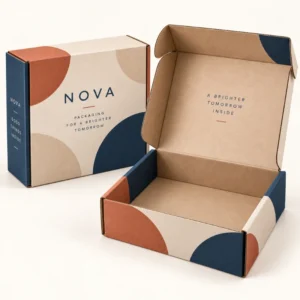
A laptop mailer box is a sturdy outer box made to carry a laptop safely through sorting, stacking and delivery, with cushioning that stops the device sliding and absorbs knocks along the way. It usually combines strong corrugated board with foam inserts or a fitted inner tray, plus a separate space for a charger and cables so hard accessories cannot scratch the screen or lid. For repair returns, refurbished sales, rentals and office moves, this kind of box turns a fragile and valuable item into a parcel that can be handled with confidence.
What a laptop mailer box should protect
A laptop is vulnerable in different ways from most boxed goods. The screen can crack under pressure, corners can dent if the box is dropped on an edge, and a loose charger can scuff a lid during a long journey. A good laptop mailer box therefore controls movement first and absorbs impact second. The laptop should sit snugly, with no room to slide from side to side, and the lid should close without forcing the box out of shape. If you can hear or feel the device moving when you tilt the sealed box gently, the fit is not tight enough and extra cushioning or a different insert is needed.
Protection also means thinking about the whole journey, not only the moment the box leaves your premises. Parcels are stacked, turned, loaded into vans and passed between hands and belts. A mailer with double wall board on the main panels resists crushing better than a thin single wall carton, and a clean, flat outer surface makes labelling clear and reduces the chance of a label peeling or tearing. Inside, the insert should keep the laptop away from the outer walls by a small cushioning gap, so a knock to the outside does not transfer straight to the device.
Choosing the right size for the laptop
Start by measuring the laptop with its lid closed, including length, width and thickness at its thickest point. Many laptops sold as 13 inch, 14 inch, 15 inch or 17 inch models differ in actual footprint, so screen size alone is not a reliable guide. Add enough room for the insert thickness, then check that the closed box still feels firm rather than puffed up. A box that is far too large invites movement, while a box that is too tight can press on hinges and corners. Adjustable foam cushions are useful when you ship more than one laptop size in the same box style, because they can be repositioned to close the gap around a smaller machine.
Measuring before you order
Measure length first, then width, then thickness, and note whether a sleeve or case will travel with the laptop. If a sleeve is included, measure the laptop inside the sleeve, because that is the shape the insert must hold. Keep a record of the largest and smallest laptops you expect to ship, and choose a box and insert combination that covers that range without leaving a large empty space. A sample pack, checked with your real devices before a larger order, is the simplest way to avoid a costly size mistake.
Materials and inserts for a laptop mailer box
Corrugated board is the usual outer material for a laptop mailer box because it is strong for its weight, easy to print, and widely recyclable in the UK. The fluted layer between two flat liners gives the board its crush resistance, and a stronger board grade suits heavier gaming laptops or parcels that will travel further. Foam inserts, often made from polyethylene foam, cradle the laptop and absorb shocks, while a divider or upper tray keeps the charger and cables apart from the device. Some designs use a suspension style insert, where film holds the laptop away from the walls, although a foam cradle is often simpler for staff to pack quickly and consistently.
Printed mailers add a further benefit. A clear logo, handling guidance and return address on the outside make the parcel look professional and help the recipient recognise it at once. Inside print can carry simple unpacking steps, a thank you note, or a reminder to keep the box for a return. When artwork is involved, allow time for approval before production starts. After final artwork approval, standard production usually takes 10 to 14 working days as a guide only, and corrugated orders usually take 12 to 15 working days as a guide only. These are production guides, not guaranteed delivery dates.
Packing a laptop step by step
Good packing starts with a clean, dry laptop and a charged battery switched off or put to sleep according to your carrier rules. Place the laptop in its insert with the screen facing away from the charger compartment, close any sleeve, and check that nothing hard presses against the lid. Add the charger and cables in their own compartment, coil cables loosely rather than bending them sharply, and fill any remaining gap with a small amount of cushioning so nothing can shift. Seal the box with strong tape along the main seam, add a second strip across the opening for heavier parcels, and place the label flat on the largest face where it will not fold over an edge.
Common packing mistakes to avoid
The most common mistake is wrapping a laptop in loose bubble wrap and dropping it into an oversized box. That approach leaves the device free to move and gives no protection at the corners, which are often the first points to strike a hard surface. Another mistake is packing the charger on top of the laptop, where its weight and hard edges can mark the lid. A third mistake is sealing a box that bulges, because a bulging box is harder to stack, easier to tear, and more likely to be handled awkwardly. A firm, flat, well sealed box is safer and looks far more professional on arrival.
Who uses a laptop mailer box
Repair workshops use laptop mailers for customer returns, because the customer can reuse the same box and inserts to send the device back after repair. Retailers and refurbishers use them for online sales, where the unboxing experience matters as much as protection. Schools, offices and IT rental firms use them when devices move between sites, are issued to new starters, or are collected at the end of a lease. In each case, a consistent box style reduces training time for packing staff, because everyone follows the same steps and uses the same inserts.
Branding matters in these settings too. A plain brown box protects a laptop, but a printed mailer tells the recipient who sent it and what to do next. That clarity is valuable for returns, where the recipient may need to find a returns label or a QR code quickly. For businesses that send laptops regularly, ordering a single well designed mailer in a suitable quantity avoids a cupboard full of mismatched boxes and reduces the chance of a device being sent in packaging that was never meant for it.
Ordering and customisation options
When you request a quote, share the laptop sizes you ship, the quantity you expect to use, whether you need foam inserts, and whether you want print on the outside, inside, or both. Mention if chargers and cables travel with every laptop, or only sometimes, because that affects the insert design. Also mention any carrier size or weight limits you must meet, and whether the box needs to be easy to open and reseal for a return journey. Clear information at the quote stage leads to a box that fits first time, rather than a series of corrections after a sample arrives.
Questions to ask before ordering
Ask how the insert is supplied, whether it arrives fitted or flat, and how much storage space a quantity of flat boxes will need. Ask what board grade is proposed for the weight of your laptops, and whether the design has been tested with a device of similar size and weight. Ask about artwork file requirements and proofing, so your logo prints sharply and colours match your brand. These questions take a few minutes and can prevent damage, returns and repeat ordering.
To take the next step, you can shop all packaging, request a quote for a custom size, read our delivery information, learn more on the about our company page, return to the Personalized Mailer Boxes homepage, or compare a large postage box for bulkier parcels.
Frequently asked questions
What size laptop mailer box do I need?
Measure the laptop with its lid closed, including its thickest point, and add room for the insert. Screen size alone is not enough, because two laptops with the same screen size can have different footprints. A sample checked with your real laptop is the safest check.
Can a laptop mailer box hold a charger as well?
Yes, many designs include a separate compartment or upper tray for a charger and cables. Keeping accessories apart from the laptop prevents scratches and stops hard items pressing on the lid during transit.
Is a laptop mailer box reusable for returns?
Many laptop mailers are suitable for reuse, especially when the inserts are durable and the box can be resealed cleanly. For return journeys, include clear resealing guidance and a returns label, and check the box for dents or torn inserts before reuse.
Can I have my logo printed on a laptop mailer box?
Yes, custom printing can add your logo, brand colours and handling or returns guidance to the outside or inside of the box. Artwork approval comes before production, so allow time for proofs and any changes.
What material is best for shipping a laptop?
Strong corrugated board for the outer box, combined with foam inserts that cradle the device, is a widely used combination. The board resists crushing and stacking pressure, while the foam absorbs shocks and stops movement inside the box.