
mailer box mockup
Showing all 2 results
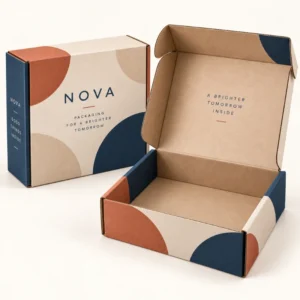
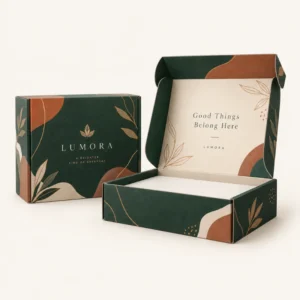
A mailer box mockup is a realistic visual that shows how your artwork will look on a finished mailer box before any board is printed. A mailer box mockup lets you check logo placement, colour, pattern flow and text legibility on the top, sides and inside lid, so design mistakes can be fixed while they are still easy to change. It is also a practical tool for presenting a design to colleagues, clients or a manufacturer and for creating product images before stock arrives.
What a mailer box mockup shows you
A good mockup does more than place a flat logo on a box photograph. It shows the box in perspective, with folds, shadows and edges that reveal how artwork behaves in real life. A pattern that looks even on a flat file may stretch or break at a corner, a headline may sit too close to a fold, and a pale colour may lose contrast against kraft board. Seeing those issues in a mockup helps you adjust spacing, scale and colour before print. Mockups are also useful for comparing options side by side, such as a bold exterior with a plain interior against a fully printed interior, or a kraft finish against a white finish.
Closed, open and angled views
Different views answer different questions. A closed view shows the first impression a customer gets on the doorstep and is the image most often used for a shop listing. An open view shows the reveal, including inside print, tissue, inserts and the way the product sits in the box. An angled view shows depth and how the top and side panels work together. For a complete check, look at all three if you can. If you only have one view, prioritise the view your customer will see first, then check the inside separately with a flat artwork proof.
Checking text and small details
Small text is where mockups earn their value. Read every line at the size it will appear in the mockup image, and also imagine it at full box size. Website addresses, care notes, social handles and legal lines are often set too small or placed too close to a fold. Check that a logo is not cut by a tuck flap, that a pattern does not create an awkward join, and that contrast remains clear in shadowed areas. If a detail cannot be read in the mockup, it will probably be hard to read on the printed box too.
How to use a mailer box mockup in the design process
Start with the real box size and the real product, not a generic template that ignores your proportions. A tall, slim box and a wide, shallow box present artwork very differently, even with the same logo. Place your artwork on the correct panels, keep important elements clear of folds and seals, and test the design in both bright and muted lighting if the mockup allows it. Then share the mockup with someone who has not seen the design before and ask what they notice first. Fresh eyes often spot a crowded layout or an unclear message that the designer has stopped seeing. You can see related printed options in the shop for printed boxes and find the team background on the about us page.
From mockup to print ready artwork
A mockup is a preview, not a print file. The print file still needs correct resolution, colour settings, bleed where required and a dieline that matches the chosen box. Use the mockup to agree the design direction, then confirm the technical file with the manufacturer before production. Keep a note of the exact colours, fonts and panel positions approved in the mockup, so the final proof can be checked against them. If the manufacturer supplies a proof based on your approved mockup, compare the two carefully rather than assuming they match.
Common mockup mistakes to avoid
One common mistake is judging colour from a single screen, since screens vary in brightness and colour settings. Another is using a mockup with the wrong box proportions, which can hide fit problems. A third is adding extra elements to the mockup, such as props or products, that distract from the box itself. Keep the focus on the box, use a neutral background for design checks and save a version with a plain background for listings and presentations. When you are ready to move from preview to production, you can request a quote for mailer boxes and share your mockup and artwork details.
Mailer box mockup uses beyond design approval
Mockups are also valuable for marketing. A realistic box image can be used on a product page, in a launch announcement, in a wholesale catalogue or in a social post before printed stock is ready. This helps customers understand the full product, including packaging, and helps retailers picture the item on a shelf or in a gift set. For subscription brands, a mockup can show the monthly reveal without waiting for the first printed run. Just be clear when an image is a mockup rather than a photograph of the finished box, so customers are not misled about texture, finish or exact colour. Planning details, including lead times after artwork approval, are listed on the delivery information page.
Showing shipping in a mailer box mockup
A mailer box mockup should show the box as it will look after shipping, not only as it will look on a retail shelf. Include the delivery label area, the seal and any scuff prone edges in the mockup, and check the artwork at the size it will appear when the box is closed and taped for transit. A mockup that ignores shipping can approve a design that looks perfect in a photograph and fails in a courier journey, while a mockup that plans for shipping helps a brand approve print, board and closure choices before a full run is ordered.
Frequently asked questions
What is a mailer box mockup?
A mailer box mockup is a realistic image that shows your design applied to a mailer box, usually in closed, open or angled views. It helps you preview layout, colour and unboxing impact before printing.
Is a mockup the same as a print proof?
No. A mockup shows how the design will look in perspective, while a print proof checks the technical artwork, spelling, colours and panel positions for production. You should check both before approving a print run.
Can a mockup show inside print?
Yes, if you use an open view. An open mockup shows the inside lid and base, which is useful for checking inside messages, patterns and the way inserts sit in the box.
Will colours in a mockup match the printed box exactly?
Not always. Screens display colour differently from print, and board colour affects the result, especially on kraft. Use the mockup for layout and impact, and use a print proof for colour decisions.
Can I use a mockup for my shop listing?
Yes, provided it is clearly representative of the box you will supply. A clean mockup is useful before photography is available, but replace it with real photographs once printed stock arrives if you can.