
mailer box mockup psd free
Showing the single result
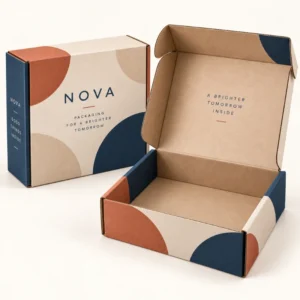
A mailer box mockup psd free file is a layered Photoshop file, available at no cost, that lets you drop your artwork into editable panels and see it rendered on a realistic mailer box. A mailer box mockup psd free template is useful because each visible panel is usually linked to a smart object, so your flat artwork is warped, shaded and folded to match the box shape automatically. That makes it a practical bridge between a flat design file and a finished printed box, especially when you need to present several design options quickly.
What makes a mailer box mockup psd free file work well
The value of a PSD mockup lies in its layers. A well organised file separates the box shape, shadows, highlights, background and each artwork panel, so you can change one element without disturbing the rest. Look for clearly named layers, separate panels for the top, front, sides and inside lid, and a background layer you can switch to a plain colour for listings. A file that flattens everything into one layer, or that hides artwork panels inside confusing groups, will waste time and may produce a misleading preview. Resolution also matters: a high resolution file keeps text and fine patterns sharp when you export a presentation image, while a very low resolution file can make a good design look soft.
Smart objects explained in plain language
A smart object is a placeholder layer that holds your artwork separately from the mockup scene. When you open the smart object, paste in your design, save and return to the main file, the artwork appears on the box with the correct perspective and shading. This means you can update the artwork many times without rebuilding the scene. If you change a logo, you only need to update the smart object, not redraw the box. Keep your artwork inside the smart object at a sensible resolution, and avoid stretching it to fit a panel that has very different proportions, because that will distort lettering and logos.
Setting up artwork inside a smart object
Before you paste artwork in, check the panel size and orientation in the smart object. Place the logo and headline first, then add patterns or secondary graphics, and keep important text clear of panel edges and fold lines shown in the template. Save the smart object, return to the main file and view the result at full size and at a smaller size. If a pattern joins awkwardly at a corner, adjust the pattern scale or starting point inside the smart object rather than trying to fix it on the main scene. Save a copy of the PSD with your artwork in place, so you can return to that version if a later edit goes wrong.
Using a mailer box mockup psd free file for client and team approval
PSD mockups are particularly useful when a design needs approval from people who do not work with print files every day. A realistic image communicates the idea faster than a flat dieline, and it invites useful feedback about hierarchy, colour and message. Export a few clear views, such as a closed box and an open box, and label them plainly so reviewers know what they are looking at. Ask reviewers to comment on the message and the overall look, not on exact print colour, because screens vary. Keep feedback in one place, apply it inside the smart objects and re export, so each round of approval is based on the latest version. You can explore printed options in the shop for printed boxes and read about the service on the about us page.
Limitations to keep in mind
A PSD mockup cannot show every physical property of a printed box. It cannot reliably show the exact texture of kraft board, the feel of a matte lamination, the shine of foil or the way a box behaves when it is folded and packed repeatedly. It also cannot confirm that your product fits inside the box, because most templates use standard proportions. Treat the mockup as a visual approval tool, and confirm size, board, finish and fit through a manufacturer proof and, where possible, a physical sample or a test pack with your real product.
Exporting images for listings and presentations
When you export, choose a clean background and a file size that suits the destination. A product page usually needs a sharp, well lit image without distracting props, while a social post may need a square crop and a simpler composition. Export at the resolution required by the platform, check the image on a phone as well as on a desktop screen, and keep the original PSD so you can re export if a platform changes its image requirements. Do not present a mockup as a photograph of a finished box if the box has not been printed yet; label it as a preview where that distinction matters.
From a mailer box mockup psd free preview to printed boxes
Once the design direction is approved in the mockup, the next step is to prepare print ready artwork on the correct dieline and confirm the specification in a quote. Lead times after final artwork approval are standard 10 to 14 working days, corrugated 12 to 15 working days and rigid or specialist 13 to 16 working days, so build proofing time into your schedule. Details are on the delivery information page. When you are ready, you can request a quote for mailer boxes and share your mockup, artwork and box requirements.
Frequently asked questions
What software do I need for a mailer box mockup psd free file?
You need software that can open layered PSD files with smart objects, most commonly Adobe Photoshop. Some other editors can open PSD files, but smart object editing may work differently, so check compatibility before you start.
How do I change the artwork in a PSD mockup?
Open the smart object layer for the panel you want to change, paste or place your artwork inside it, save the smart object and return to the main file. Your artwork should then appear on the box with perspective and shading applied.
Can I change the box colour in a PSD mockup?
Often yes, if the file includes a separate colour or texture layer for the board. Change that layer rather than painting over the artwork, and check the result in both bright and shadowed areas.
Are free PSD mockups suitable for commercial use?
It depends on the licence. Some free files allow commercial use, others require credit or restrict certain uses. Read the licence before publishing any exported image.
Does a PSD mockup replace a print proof?
No. A mockup previews the design, while a print proof checks the technical artwork for production. Always approve the proof before printing.