
mailer box mockup free
Showing the single result
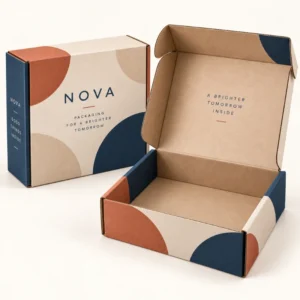
A mailer box mockup free template is a no cost preview file that lets you place your artwork on a realistic mailer box image without paying for a custom visual first. A mailer box mockup free download can help a new brand test a logo, a colour palette or a pattern, and can help an established brand compare design directions before ordering printed boxes. The key is to choose a template that matches your box shape and proportions, and to check the licence terms before you publish the resulting image.
What a mailer box mockup free template usually includes
Free templates vary widely in quality. A useful one will show a recognisable mailer box shape, with a clear top panel, side panels and, in an open version, an inside lid. Some sets include several views, such as a closed box, an open box and a stacked group, which makes it easier to present a design consistently. Others include only a single front view, which is fine for a quick logo check but less useful for judging how a pattern wraps or how inside print will look. Before you spend time on a template, check the image resolution, the file type and whether the artwork areas are clearly separated, because a low resolution image will hide small text problems and a poorly organised file will slow you down.
Free versus paid mockup files
Free files are best for early exploration, internal checks and simple presentations. Paid files often offer more views, higher resolution, better lighting and more precise folds and shadows, which matters for a shop listing or a client presentation. If a free template looks flat, distorted or obviously generic, it may mislead you about your own design. In that case, it is better to use a simpler, cleaner free template for layout checks and rely on a manufacturer proof for the final print decision. Do not judge a premium finish, such as foil or soft touch lamination, from a free template that was not built to show that finish.
Licence and usage checks
Free does not always mean free for every use. Some templates allow personal and commercial use, others require credit, and others restrict use in paid advertising or resale. Read the licence that comes with the file, keep a copy of it with your project notes and check whether you may use the resulting image on a product page, in social content or in a wholesale catalogue. If the licence is unclear, use the image only for internal design checks and choose a clearly licensed file for anything public. This small check protects your brand and respects the template creator.
How to get the best result from a mailer box mockup free file
Start by matching the template to your intended box. A shallow literature style mailer and a deep subscription box will not present the same artwork in the same way, so a close match matters more than a stylish background. Place your logo and key message first, then add pattern or secondary elements, and step back to see what the eye notices first. Test the design at a small size, as it might appear in a search result or a social feed, and at a larger size for a product page. If text becomes unreadable at small size, simplify it rather than shrinking the whole design to fit more words in. You can explore printed box options in the shop for printed boxes and learn about the service on the about us page.
Checking colour, contrast and readability
Colour on screen is only a guide. Use a free mockup to check contrast and hierarchy, not to approve an exact print colour. Dark text on a dark panel, pale text on kraft and thin lettering over a busy pattern are all problems a mockup can reveal early. Try the design in greyscale as a quick test: if the message still reads clearly without colour, the layout is probably strong. Also check the design against a plain background and against a lifestyle background, because a busy background can make a good box design look cluttered in a presentation image.
Preparing artwork for a free template
Prepare a clean version of your logo, a short headline and any pattern as separate elements if the template allows it. This makes it easier to move elements, test sizes and keep text sharp. Avoid pasting a low resolution screenshot of your design into a template, because the result will look soft and may hide alignment issues. Save versions as you go, with clear names for each direction, so you can compare options without losing an earlier idea. When a direction is agreed, keep the mockup alongside the final artwork file for reference during proofing.
When to move beyond a mailer box mockup free preview
A free preview is a starting point, not a substitute for a manufacturer proof. Once you have chosen a design direction, confirm the box size, board, print coverage and finish with a quote, and check the proof against your mockup. Lead times after final artwork approval are standard 10 to 14 working days, corrugated 12 to 15 working days and rigid or specialist 13 to 16 working days, so allow time for proofing in your launch plan. Full planning details are on the delivery information page. When you are ready, you can request a quote for mailer boxes with your chosen design and specification.
Frequently asked questions
What is a mailer box mockup free template?
It is a preview file available at no cost that lets you place your artwork on a realistic mailer box image. It is useful for testing design ideas before ordering printed boxes.
Can I use a free mockup image on my product page?
Only if the licence allows commercial use. Check the terms that come with the file, and use a clearly licensed template for any public image.
Will a free mockup show my exact box size?
Not necessarily. Free templates use common shapes and proportions, so they are best for layout and impact checks. Confirm exact size, fit and print with a manufacturer proof.
Do free mockups show print colours accurately?
No, they show colour approximately. Screens and board types affect colour, so use the mockup for layout and contrast and use a print proof for colour approval.
Is a free mockup enough before I order?
It is enough to choose a design direction, but not enough to approve production. Always check the manufacturer proof for spelling, panel positions, colours and fit before printing.