
gable box mockup
Showing the single result
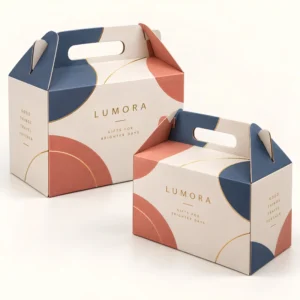
A gable box mockup is a realistic preview image that shows your artwork applied to a gable box, so you can see how the design will look before any board is printed or cut. It presents the peaked top, the handle, the side panels and the shadows as a customer would see them, rather than as flat artwork on a screen. For brands, designers and event planners, a gable box mockup turns an abstract file into a decision you can judge with confidence.
What a gable box mockup is for
Mockups serve several different purposes, and the best type depends on which one you need. A designer uses a mockup to test layout, colour and type at realistic scale. A brand owner uses it to compare design options side by side before choosing one. A client or a wedding couple uses it to approve a favour box design without waiting for a physical sample. A seller uses mockup images for listings and social media, because a realistic box photograph, even a digital one, communicates the product far better than a flat artwork file. In each case, the mockup is a preview and a communication tool, not a substitute for checking the physical box where exact colour, board texture or fold quality matters. For the finished shape the mockup represents, see the gable box collection and note the handle and peaked top that a good preview must show accurately.
Mockups also save time in revisions. A layout problem that is obvious in a mockup, such as a logo sitting across a fold or type that is too small on a side panel, can be fixed in minutes in the artwork file. The same problem found after printing would require a reprint. Use mockups early, when changes are cheap, and use them again after major revisions, so the final approval reflects the artwork that will actually go to production.
Types of gable box mockup
The simplest mockup is a single front view, showing one side panel and the handle, which suits a quick logo check or a social media post. A three quarter view shows two panels and the top, giving a better sense of depth and of how a pattern wraps around a corner. A set of views, including front, side and top angles, suits a full brand approval, because it reveals details that a single view hides, such as end panel text or pattern alignment. Some mockups show a single box on a plain background, which keeps attention on the design, while others show the box in a scene, such as a bakery counter or a gift table, which helps a client imagine the product in use.
Flat artwork, 3D preview and photograph
Flat artwork shows the design as it will be printed on the unfolded blank, which is essential for production but hard for a non designer to interpret. A 3D preview or mockup wraps that artwork around a digital box model, adding perspective, light and shadow. A photograph of a physical sample shows real board, real print and real folds, which no digital preview can fully replace. The strongest approval process uses all three in sequence: flat artwork for production accuracy, mockup for visual judgement, and a physical sample where colour or texture is critical.
Creating a useful gable box mockup
A useful mockup starts with accurate artwork, placed on the correct panels and at the correct scale. Keep the logo on the flat side panel, keep pattern on the angled panels where it belongs, and do not stretch artwork to fill a panel it was not designed for. Use the board colour in the mockup, because kraft board and white board change how colours appear, and include any window, foil or emboss effect only where it will actually be produced, so the preview does not promise a finish that production cannot deliver. Check the mockup at the size it will be viewed, whether that is a phone screen, a laptop or a printed proof, because detail that looks fine large can vanish small.
Lighting, background and realism
Lighting and background affect how believable a mockup looks. Soft, even light with a gentle shadow under the box reads as realistic, while harsh light or a cluttered background distracts from the design itself. A plain, light background suits most approvals, because it keeps the box as the focus and matches how the box will appear in a shop listing. If you use a scene mockup, keep props minimal and relevant, such as a few treats beside a bakery box, so the box remains the subject rather than part of a busy photograph.
Checking a gable box mockup before approval
Check a mockup as if it were the finished box. First, read every word for spelling and accuracy, including names, dates and small panel text. Then check logo placement, colour and contrast on each visible panel, and check that no essential text sits on a fold, in the handle slot or on a panel that will be hidden when the box is carried. Then view the mockup from the angles a customer will see, including from above and from the side, and ask whether the design still reads clearly. Finally, compare the mockup with the flat artwork, to confirm that the preview has not hidden a layout problem on a panel the mockup does not show.
Common mockup mistakes
Common mistakes include artwork stretched to fit, colours that look brighter on screen than they will in print, and a mockup that shows a finish, such as foil, that was not included in the production brief. Another frequent mistake is approving a design from a single mockup view, then discovering an end panel problem only after printing. Avoid these by checking multiple views, by viewing the mockup on a calibrated screen where possible, and by confirming finishes and board type in writing alongside the mockup approval. A mockup approval should record which artwork version it relates to, so there is no confusion if the file changes later.
Mockups for listings and marketing
For listings and marketing, a mockup should be honest about the product. Show the box at a realistic size relative to its contents where possible, avoid filters that change brand colours, and do not add props that suggest contents or sizes the customer will not receive. A clear, well lit mockup builds trust, because customers can picture the box they will actually receive. Pair mockup images with a plain description of size, contents and materials, so the image supports the facts rather than replacing them.
From gable box mockup to printed box
Once a mockup is approved, production moves to final artwork, proofing and printing. Standard boxes are usually produced in 10 to 14 working days after final artwork approval, corrugated boxes take 12 to 15 working days after final artwork approval, and rigid or specialist constructions take 13 to 16 working days after final artwork approval. These timings cover production after approval, not a guaranteed delivery date, so allow time for mockup revisions in your schedule. If your design needs a bespoke size or print, explore a custom gable box option or request a quote with your mockup brief to discuss the next step.
Frequently asked questions
What is a gable box mockup?
A gable box mockup is a realistic preview image showing artwork applied to a gable box, including its peaked top, handle and side panels. It helps you judge layout, colour and type before printing.
Is a mockup the same as a physical sample?
No, a mockup is a digital preview, while a physical sample is a real printed and folded box. Use a mockup for visual approval and a physical sample where exact colour, board texture or fold quality must be confirmed.
How many mockup views should I check?
Check at least a front view and a three quarter view, and add side and top views for a full approval. Multiple views reveal panel alignment and end panel problems that a single view can hide.
Can I use a gable box mockup for my shop listing?
Yes, mockups work well for listings and social media, provided they show the real design, colours and box shape honestly. Pair the image with accurate size and material details so customers know what they will receive.